Teamwork is a part of daily business in most companies – but a team is only strong and effective if the framework conditions are right. The most important thing is to be able to learn from each other. How collaboration can be realized digitally with the blink.it platform is shown in four practical examples of digital teamwork.
Teamwork means: Learning from each other, also completely digitally
"Being a team player" is probably one of the most popular and important soft skills, both in school and in everyday professional life. In many companies, working together on projects or tasks is commonplace. However, teamwork involves more than just coordinating with colleagues or managers. Working as a group also includes knowing your own skills – and learning from and with others!
Learning is generally a major topic for companies, usually in the context of professional development. For building knowledge, blended learning has been probably the most successful method for years: The combination of online and face-to-face learning offers diverse advantages for companies in further education, such as a high transfer into daily work.
What does blended learning have to do with digital teamwork?
Teamwork and blended learning share a common goal: Interlocking independent and joint work in order to enable effective learning. Only in this way can modern workplace learning be implemented and put into practice.
💡 Digital collaboration is particularly successful and sustainable when learning is integrated directly into daily work and employees build up and apply knowledge together.
The basic requirement for digital collaboration is always a suitable learning platform that all team members can access and use to exchange information.
We at blink.it are convinced that an online platform for blended learning only needs three very simple requirements: You can
easily (without technical prior knowledge)
own content (that perfectly fits your topic)
create yourself (without being dependent on third parties).
This allows many further education topics to be mapped as blended learning. But it also makes blink.it an ideal platform for digital collaboration – virtually "blended teamworking"!
Distribution of roles in digital teamwork
Teams are always about the distribution of roles – and the same applies to blink.it! Generally, there are two important roles on the blink.it platform that are important for the following teamworking methods:
Participants, as the name suggests, basically take part in the courses and can view content as well as write comments on it.
Admins (administrators) can see content, and within a course, they can create content and release it to others.
Below, I will introduce you to our four methods for digital teamwork with blink.it and give you insights into our own methods for collaborating effectively digitally. With these tips, you can also make teamwork in your company more digital, simpler, and more productive!
4 methods for digital teamwork (examples with blink.it)
Video protocols
Onboarding courses
Video diary
Knowledge management
Teamwork method 1: Video protocols
Joint coordination in meetings is particularly important in teamwork. In this context, not only the progress in one's own team is interesting, but often also coordination with other teams or departments in the company. Keeping video protocols helps to recall agreements at any time – or to make all important information accessible to absent employees.
Method: We keep video protocols of our weekly team meeting. Each team reports news and important events from the past week, as well as the most important topics for the coming week. These meetings are recorded (using a laptop or tablet) and uploaded to a blink.it course. At the end, questions can be asked or issues clarified that are not only relevant to one's own team.
Role distribution: One responsible person takes over the organization as admin, creates a new blink for each meeting, and uploads the video. All other employees are participants who can watch and comment on the videos.
Teamwork method 2: Onboarding courses
When new employees join a company, a department, or a team, onboarding has the highest priority. Besides getting to know colleagues and managers, understanding the corporate culture, processes, and workflows is also important. In a way, professional training takes place for the employee as an introduction to the new company.
Method: An experienced colleague from the new team creates a blink.it course with a short introductory and welcome video, important information for the first few days, suitable videos, links, and materials. The goal is for the new team member to find their way around quickly. In addition, the onboarding course is a source of knowledge that can be accessed at any time.
Role distribution: The experienced employee is the admin, so they can create, modify, and release content. The new employee is a participant and can address questions or ideas directly and personally at the workplace.
Tip: When I started at blink.it, I wrote a detailed article about my personal experiences with blended onboarding.
Teamwork method 3: Video diary
In addition to pictures, links, and documents, blink.it offers the possibility to upload videos quickly and conveniently, for example from a smartphone or tablet. This makes it possible to keep video diaries. In short videos, project progress, for example, can be captured for all employees.
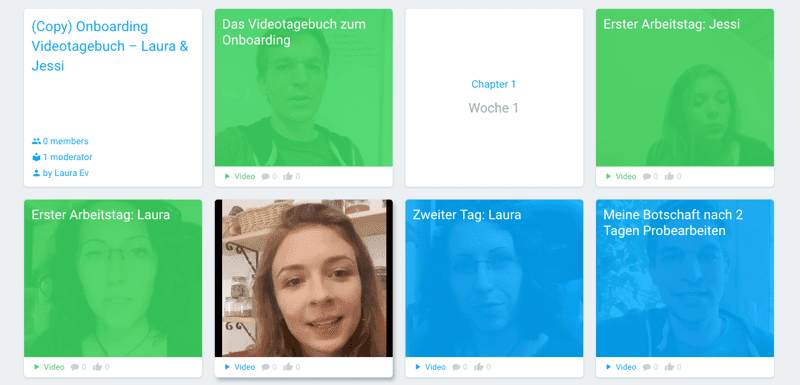
Method: We use video diaries primarily as a supplement to onboarding courses during the initial period for new employees. To reflect on new knowledge and record progress, each new employee records a short selfie video with their own smartphone (maximum 2 minutes long) after each workday during the first two weeks. The video is uploaded and made available to all employees.
Role distribution: Here, the roles are reversed! The new employee becomes the admin and uploads the content. Colleagues and managers are participants and can add tips, praise, and ideas as comments.
Example: Here you can see an excerpt from the video diary of myself (Laura) and my colleague Jessi, as well as direct feedback from blink.it founder Konstantin.
Teamwork method 4: Knowledge management
For both new employees and long-established teams, a central knowledge collection is a help in daily work. Be it an instruction for a specific process, the operation of a rarely used device, or a link collection of helpful texts: All of this can be collected in a blink.it course as a knowledge base.
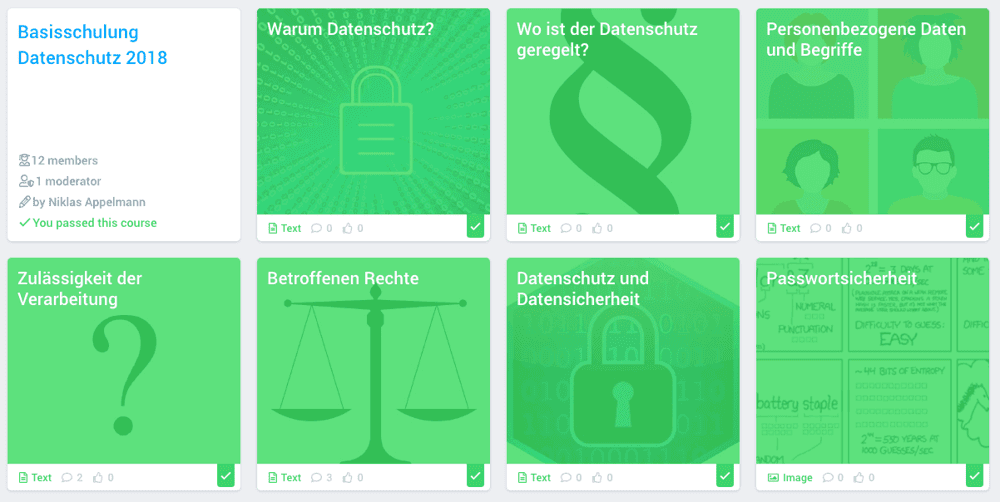
In the blink.it team: Small knowledge bases for individual teams often develop out of onboarding courses for us. These are expanded by all team members during onboarding and used again and again afterwards. But also specific courses for crucial knowledge, such as a course on the topic of data protection, are available to all employees at all times.
Role distribution: Here, all team members can take over the maintenance and supplementation of the course as admins, thus building their knowledge pool together. No one remains a pure participant, everyone works on an equal footing.
Example: This is what an internal course with knowledge for all employees at blink.it looks like. This course serves as training and reference work on the topic of data protection.
Conclusion: Methods of digital teamwork on four levels
Digital collaboration becomes particularly successful when learning, knowledge sharing, and collaboration take place in a shared environment and all employees actively contribute to the collective knowledge.
The combination of online courses and direct collaboration has proven itself not only for further education, but also in daily collaboration within teams or departments.
A blink.it course can be used on different levels for better teamwork:
As a video protocol for important meetings and information.
As an onboarding course for new team members.
As a video diary for reflection and project support.
As a knowledge base for individual teams.
In doing so, each team member is sometimes the responsible person, sometimes a participant. Everyone can contribute themselves, their ideas, and their knowledge. Entirely in the spirit of digital teamwork: Everyone together contributes to creating something bigger and new for the company.

Frequently Asked Questions and Answers
How does digital teamwork work in daily work life?
Digital teamwork works best when all team members collaborate via a central platform. There, content can be shared, tasks coordinated, and feedback given. This creates a shared workspace where information is available at all times and collaboration becomes possible regardless of location and time.
Which methods are particularly suitable for digital collaboration in a team?
Proven methods include video protocols for meetings, onboarding courses for new employees, video diaries for reflecting on projects, and central knowledge bases. These formats help to make knowledge transparent and to structure collaboration more effectively.
What role does a learning platform play in digital teamwork?
A learning platform forms the basis for digital collaboration. It bundles content, communication, and learning processes in one place. This makes teamwork clearer, prevents information from being lost, and ensures that everyone involved has access to the same level of knowledge.
Why is the distribution of roles particularly important in digital teams?
Clear roles ensure that tasks are implemented efficiently. When it is defined who creates, organizes, or comments on content, fewer misunderstandings occur. At the same time, a flexible distribution of roles can contribute to keeping all team members actively involved in the exchange of knowledge.