You can tell onboarding has been successful when new employees feel valued from the very beginning and can actively contribute to their new working environment. With the "video diary" method, you achieve exactly that: a great mix of challenge, appreciation, and integration into the new team.
How the Video Diary Method Works in Onboarding
A video diary is a collection of short video messages that new employees record during their first few weeks. It is important to note that the video diary should never be the only method used in onboarding, but should always be integrated into regular training measures.
Give your new colleague the following task:
Shoot a maximum 2-minute selfie video every evening during your training period and answer three questions. Then upload the video to your onboarding course.
Suitable questions for the selfie video include, for example, the following:
What did you like best today?
What is your most important learning today?
What else would you have wished for?

Tip: A video diary in onboarding only makes sense if you have a suitable platform in use where employees can upload the videos. At blink.it, we naturally work with our own platform, which is ideal for such training purposes.
Reasons for Using the Video Diary Method in Onboarding
Recording a selfie video takes a bit of effort—especially as a new colleague—but that is exactly what can ensure faster integration into the team. Ultimately, everyone involved benefits from the video diary method.
The "Newbie"... | The existing team... | The managers... |
gets actively involved right from the start. | sees and hears the new colleague daily—even from the home office. | easily and regularly find out if the training is going well. |
receives quick support if questions arise. | can greet and exchange ideas via the comment function under the video. | benefit from the external perspective to question existing structures. |
feels noticed and valued. | builds a bond with the new employee early on. | strengthen the feeling of belonging to the company right from the beginning. |
With all these points, it is important that interaction takes place between the new hire and the existing team and/or managers. No one wants to go through the effort of filming and uploading videos only to have them go unseen! If you are responsible for onboarding the new employee, you should therefore officially announce the video diary and encourage everyone to watch and comment on the videos.
In addition, the direct manager should also record a selfie video beforehand to lead by example and briefly explain the video diary method. This video should then be uploaded exactly where the new employee's selfie videos will follow. In the next section, I will show you exactly what this can look like!
2 Examples: The Video Diaries of Sebastian and Cosima from the blink.it Team
At blink.it, we have worked with the onboarding video diary method from the very beginning. Simply because we deal daily with a product that was developed for the use of videos. But also for the reasons mentioned above: In the video diary, all "Blinkies" (that's what we call the blink.it team) can follow how the training process is going. A fun byproduct is that years later we can watch old video diaries and look back on the early days with a smile.
The video diary helped me to briefly summarize relevant things. This allowed me to review the days again.
Sebastian Bach, part of the blink.it team since July 2022
Watch the following video to understand what a video diary can look like, using blink.it employee Sebastian as an example:
Example of the video diary method in onboarding: Overview of the course by blink.it employee Sebastian (July 2022).
blink.it employee Cosima, whom you might already know as an author here on the blog, also fondly remembers her time with the video diary:
I really enjoyed the video diary. And the comments under my videos encouraged me to include even more creative and funny ideas.
Cosima Bähr, part of the blink.it team since June 2022
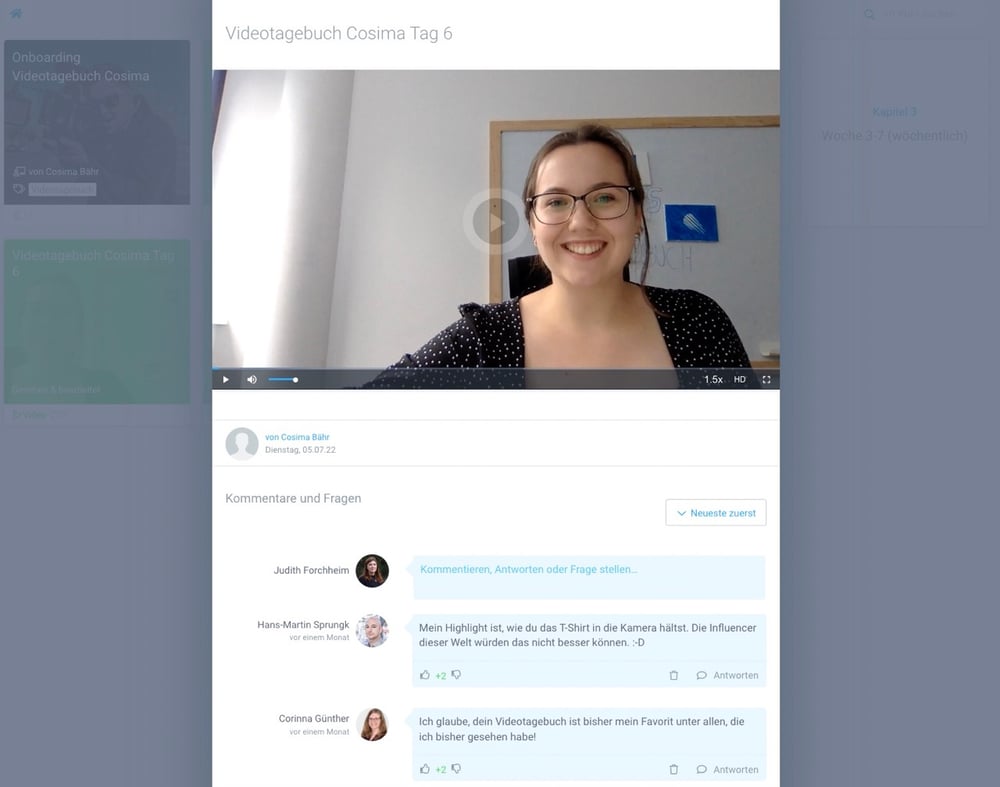
Example of the video diary method in onboarding: A selfie video from blink.it employee Cosima (June 2022).
Psst: Next week, my colleague Cosima will publish a complete experience report about her onboarding. It will cover not only the video diary, but also other measures during the training period.
More Ideas Around Successful Onboarding
The video diary is just one of many methods for successful onboarding. In our blog, you will find many other articles on the subject of onboarding, for example:
Conclusion
A video diary in onboarding combines reflection, feedback, and personal exchange, making new employees active participants in their own onboarding right from the start.
The method is simple: New employees regularly record their experiences and key insights in short videos. At the same time, the team and managers get a direct insight into the progress of the onboarding and can react early in case of questions or problems.
However, interaction is crucial. If the videos are merely uploaded and then ignored, a major benefit of the method is lost. Comments, feedback, and exchange with colleagues are what turn the video diary into a real onboarding tool.

Frequently Asked Questions and Answers
What is a video diary in onboarding?
In a video diary, new employees regularly record short videos during their onboarding to capture experiences, insights, and open questions. The videos are shared within the onboarding course with the team or managers.
Which questions are suitable for an onboarding video diary?
Suitable questions include "What did you like best today?", "What is your most important learning?", or "What else would you have wished for?". The questions should allow for a brief reflection on the workday.
What benefits does a video diary offer during onboarding?
New employees reflect on their onboarding and can voice questions or wishes early on. At the same time, colleagues and managers gain insights into the onboarding process and can respond with feedback and support.
What do you need for a video diary in onboarding?
A digital learning environment is required where employees can easily upload and share their videos with others. Comment functions are particularly helpful so that the team and managers can respond directly to the posts.